User Preferences
Personal preferences control how you edit mail templates. Choose Edit Preferences on the Document Mail Templates page or in the template editor to open Document Mail Template User Preferences.

This page shows only your own preferences; you cannot use it to edit another user's preferences. Your preferences apply across companies in the same environment.
Available Preferences
| Setting | Description | Default |
|---|---|---|
| Editor Type | The editor to use when opening a mail template: Standard, Advanced or HTML. |
Advanced |
| Editor Height (pixels) | The height of the editor, between 400 and 2000 pixels. |
650 |
| Include Data Item Names | Includes the data item name in column placeholders generated by the report-column lookup, for example {{Header.Amount}} instead of {{Amount}}. |
Off |
| Align Translations on Save | Whether Copilot updates the other language versions when you save changes: Automatically, Ask or Never. This applies only when Copilot is enabled. | Never |
The data-item-name choice can also be changed in the column lookup, and the editor type can also be changed with the editor actions. These choices update the same personal preferences.
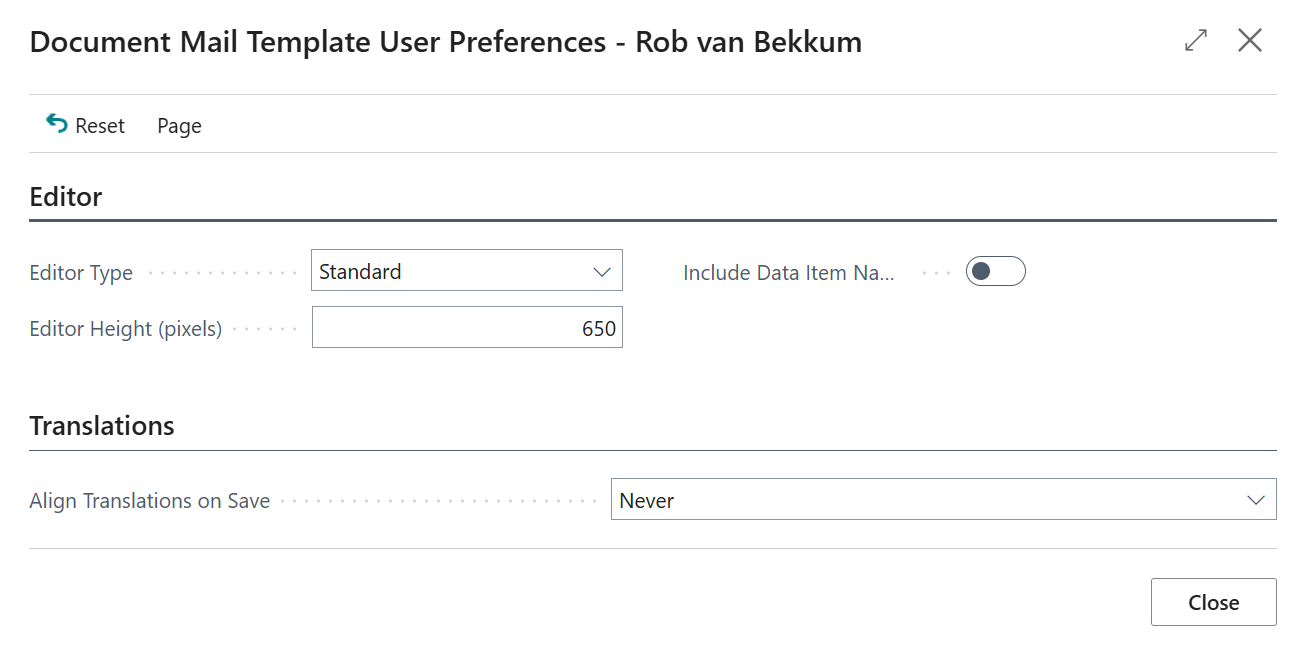
When you return to the editor from Edit Preferences, the editor type, height and translation-alignment preference are applied without saving or reloading your pending template edits.
Resetting Preferences
Choose Reset and confirm to restore all preferences to the defaults listed above. Only your own preferences are reset; mail templates, report selections and other users' preferences are unchanged.
Note
Defaults are used for new preference records and when you choose Reset. Existing preferences are not automatically changed when an extension update introduces a different default.